
AID Systems Guide — MiniMed 780G
Medtronic MiniMed 780G
The 780G is one of the most aggressive commercially available AID systems for tackling high glucose levels. Highly automated, with strong overnight control and continuous background learning.
About this system

The MiniMed 780G is sometimes described as the Incredible Hulk of AID systems: the strongest there is for crushing after-meal highs.
Want to listen to the podcast? Episode 3: Mastering the Medtronic 780G – The Hulk of AID explores how SmartGuard auto-corrections work, how to optimise settings, and how to manage exercise, high-fat meals, and hypo prevention.
Key features of this system:
- Among the most aggressive systems for tackling high glucose levels and optimising time in range (3.9–10.0 mmol/L / 70–180 mg/dL)
- Highly automated, requiring minimal user intervention
- Strong overnight glucose management
If you are on the MiniMed 780G, this guide covers:
- How the SmartGuard algorithm works
- Starting settings
- Tips and practical approaches
- Preventing and managing hypos
- High-fat meals
- Exercise
How the algorithm works
The Medtronic 780G system has three components:
- Medtronic 780G pump
- Guardian Sensor 3, Guardian 4, or Simplera
- The SmartGuard algorithm inside the pump
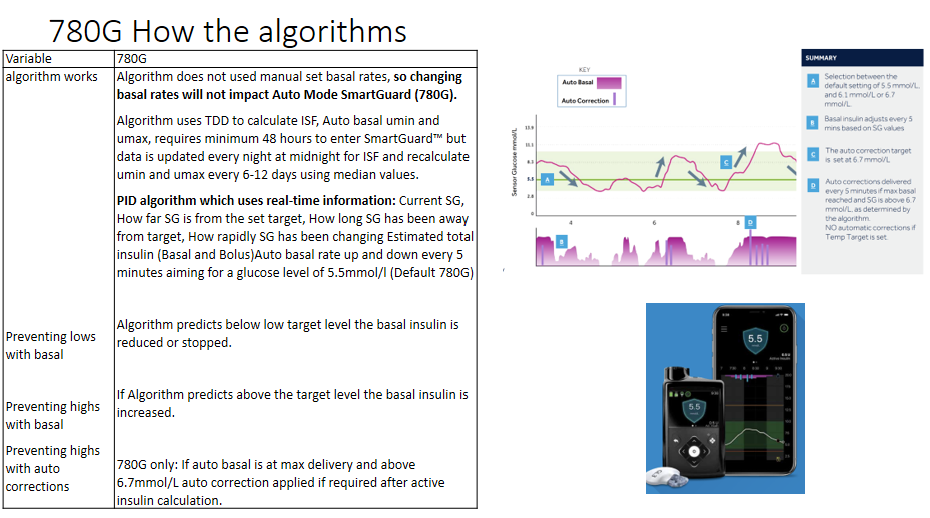
Key principles of how the algorithm tends to behave:
- The algorithm auto-calculates basal rates and correction factors
- Basal insulin increases when glucose is rising
- Auto-corrections are delivered aggressively every five minutes when glucose is rising quickly (above 6.7 mmol/L / 130 mg/dL) and basal increases are not enough
- Basal insulin decreases and suspends if glucose is predicted to go low
- The default target is 5.5 mmol/L (100 mg/dL), adjustable upwards to 6.1 or 6.7 mmol/L if needed
Starting settings
The algorithm needs your weight, average total daily insulin dose, carbohydrate ratios, and active insulin time. SmartGuard then updates continuously in the background.
You need to wear the system for 48 hours before SmartGuard can be turned on, so it can learn your insulin sensitivity.
Active insulin time (AIT) — the aggressiveness switch
AIT governs how strongly SmartGuard tackles after-meal spikes. A simple orientation guide:
- 2 hours — more aggressive
- 2.5 hours — typical middle ground
- 3 hours — more cautious / slower
You can change the target level on the 780G, but for maximising time in range it is generally left at 5.5 mmol/L (100 mg/dL). Keep basal rates and correction factors updated in case you need to move into manual mode. Once these are set, the most common ongoing adjustment is carbohydrate ratios.
Starting an AID system can be broken down into two phases:
Survive
Get safe, stable, and familiar. Focus on understanding how the system responds to you, not on optimising yet.
Thrive
Once you understand the patterns, start exploring optimisation — adjusting carbohydrate ratios, AIT, and other settings to improve time in range.
Download the How to Survive and Thrive Guide — 780G summary. A more comprehensive onboarding workbook is also available: 780G Workbook.
Tips and practical approaches
Strong time in range on the 780G tends to combine the algorithm with good underlying habits:
- Three balanced meals
- Accurate carbohydrate counting
- Bolus insulin 10–20 minutes before eating
- Being active for 10–15 minutes after eating
- Rotating cannula sites
Follow these and you may find: 99 Problems But Highs Ain’t One (download/share)
Other practical points to be aware of:
- Always suspend the pump when disconnecting (showers, sport, and similar)
- Keep manual mode settings updated in case SmartGuard stops — this means keeping basal rates, correction factors, and target level current
Preventing and managing hypos
The algorithm tends to prevent many overnight hypos, but hypos will still occur — particularly if bolus insulin is too high for a given situation or exercise is unplanned.
Hypo treatment amounts often need to be smaller than before AID, because the algorithm tends to have reduced or stopped insulin at least 30 minutes earlier.
It is also worth considering a pre-emptive response if glucose is 4.0–6.0 mmol/L (70–110 mg/dL) and trending down.
The hypo treatment chart below is based on weight — the example shown is for a 30 kg person. Download the Survive and Thrive — 780G guide and enter your own weight to generate a personalised version.
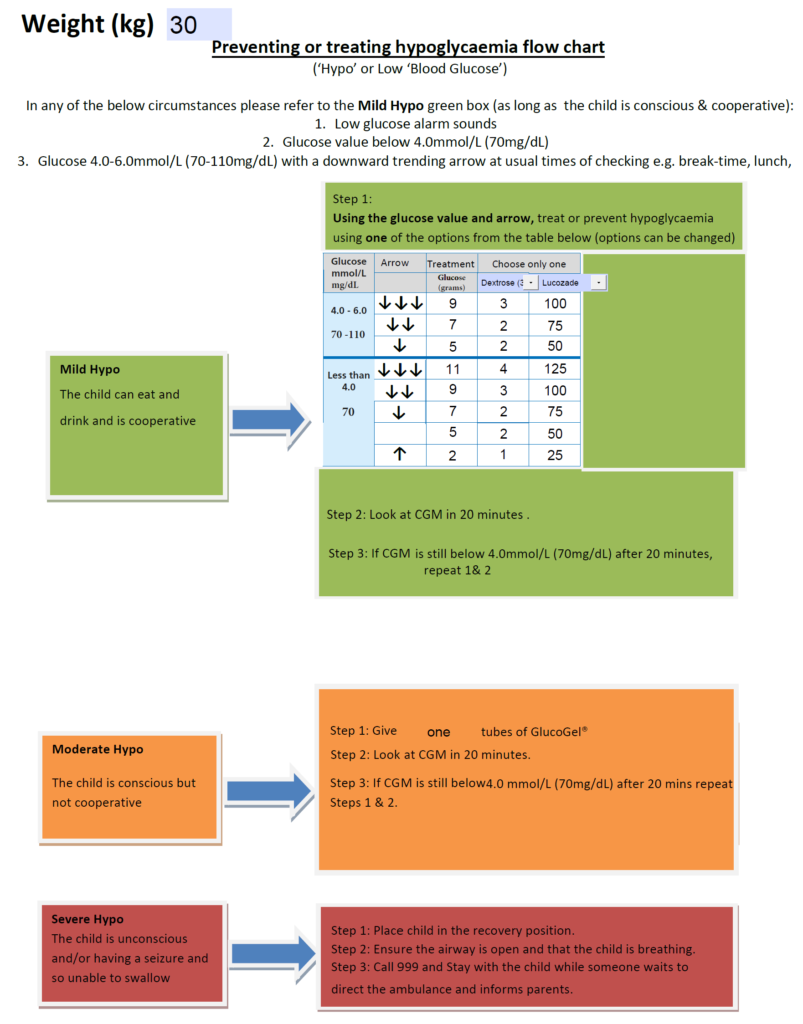
Download the 780G hypo chart to use directly.
High-fat meals
From the Mealtime Insulin Guide, we know that high-fat meals with carbohydrates (pizza, takeaways) tend to need additional insulin due to delayed gastric emptying.
When active insulin time is set between 2–3 hours, SmartGuard generally handles the delayed rise fairly well.
A starting approach for pizza: enter all the carbohydrate upfront and let SmartGuard respond to the delayed rise.
Adjusting for experience
- If you still get a delayed rise after the meal: next time, consider entering 25–50% extra carbohydrate (“fake carbs”) around 90 minutes after eating to anticipate the delayed absorption
- If you go low in the first 2–3 hours: next time, consider entering around 75% of the carbohydrates upfront
Trial and exploration is needed — individual responses vary significantly.
Exercise
There is a quick method and a more comprehensive planned method.
The quick method
Turn on Exercise mode before starting — ideally 90 minutes beforehand. Then take small carbohydrate top-ups every 20 minutes as needed.
Avoid large carbohydrate loads all at once: glucose may spike and the algorithm may increase insulin, raising hypo risk.
How many grams every 20 minutes? It depends on body weight. The example below is for a 50 kg person. Download the Survive and Thrive — 780G guide and enter your own weight to generate a personalised chart.
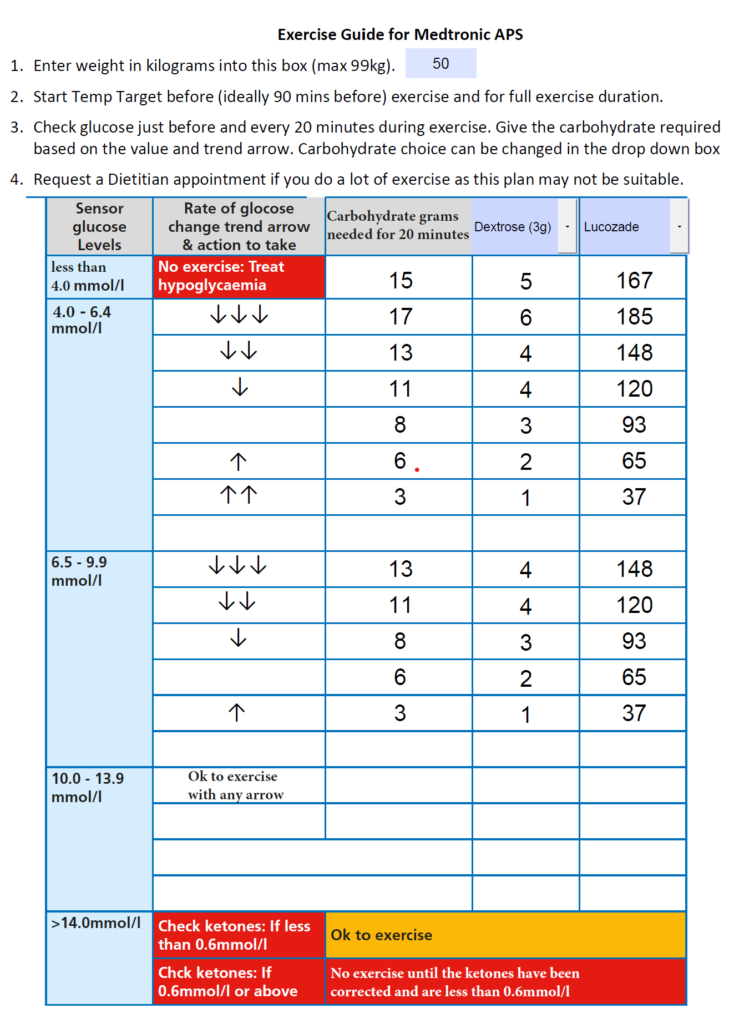
Download the exercise charts: mmol/L version and mg/dL version.
The comprehensive planned method
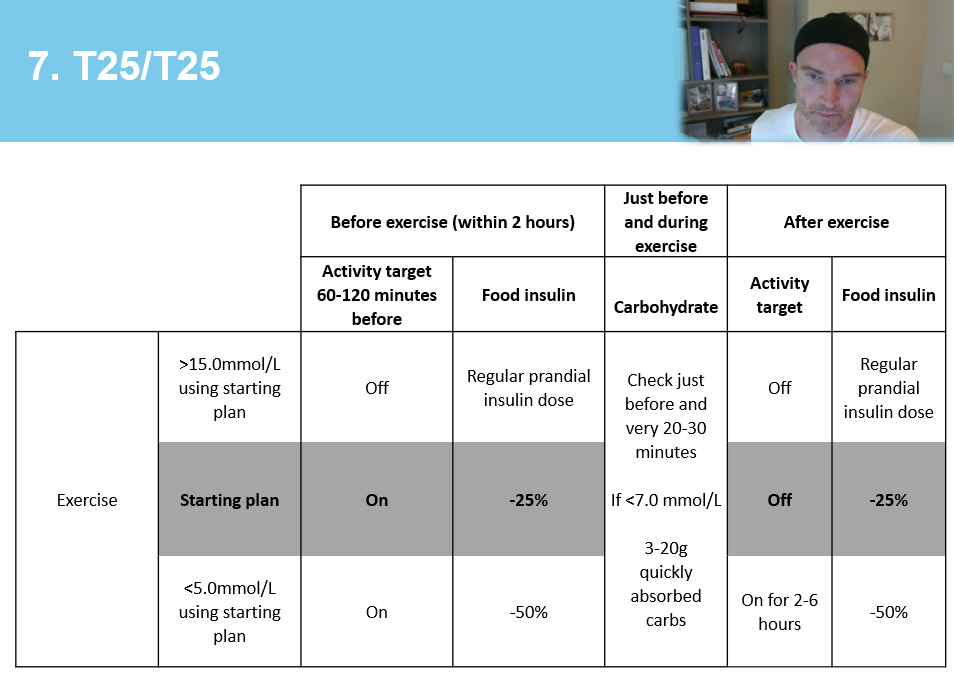
To use this approach, work through the Exercise Guide to understand exercise types, bolus reductions, and how to adapt plans after trials.
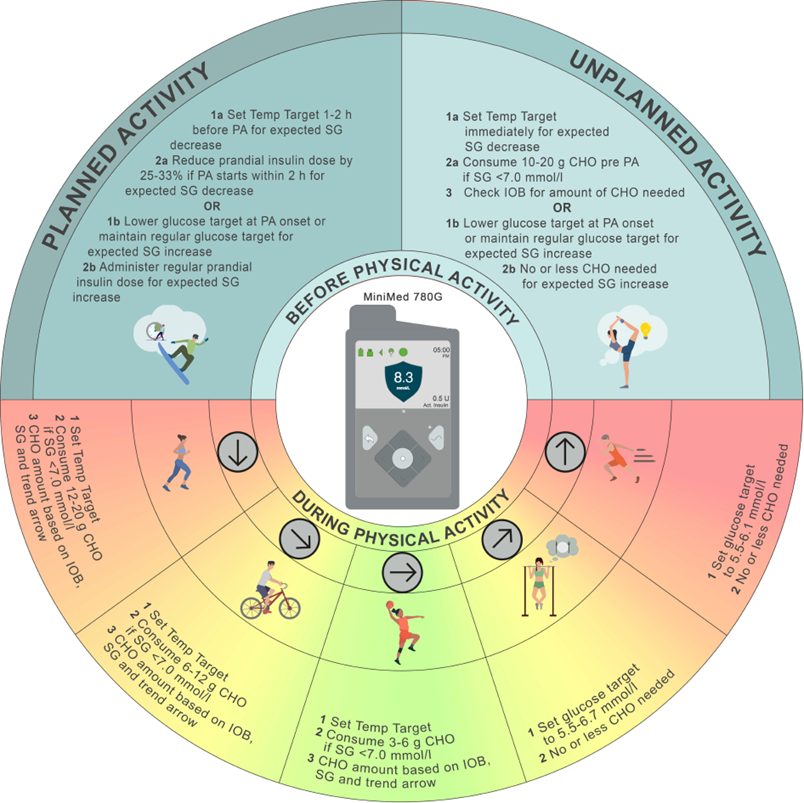
The T25/T25 table below tends to make more sense once you have read the exercise guide. The AID and Exercise Consensus Guideline is also worth reading — the infographic under the T25/T25 grid is especially helpful.
This downloadable exercise planning tool for the 780G makes creating and adapting exercise plans easier.
Key principles to take away
- SmartGuard is highly automated — but it still works best on a foundation of good carb counting, pre-bolusing, and site rotation
- Active insulin time is the main “aggressiveness dial” — explore it carefully with your care team
- The algorithm tends to reduce treatment needed for hypos, but hypos remain possible especially with unplanned exercise or missed boluses
- High-fat meals and exercise both tend to require specific approaches — explore what works for you using your CGM data as feedback
This content is for educational exploration only. It describes average responses and general principles. It is not medical advice and cannot replace individual clinical guidance from your diabetes care team.
Explore the 780G with the GNL tools
The GNL AID System Explorer generates exploratory ranges for basal rates, carbohydrate ratios and correction factors based on your inputs. The explainer page walks through how the 780G algorithm works and what Active Insulin Time means across the five responsiveness levels.
Use this tool for education and discussion, not as medical instruction.