
CGM Guide — Part 3
What Functions Do CGM Systems Offer?
Alarms, sharing, AID integration, calibration, and sensor management — the practical differences between systems that affect everyday life with a CGM.
A reminder before we look at features
For insulin dosing decisions, we only have sufficient data for a small number of CGM systems.
The features discussed on this page apply only to those systems. Safety and risk assessment always come first.
Before the fancy stuff: the lost art of finger-prick blood glucose testing
Most of the time (99%), the best CGMs provide readings reliable enough for insulin dosing. But in the minority of moments — when the data looks wrong, does not match your lived experience, or the technology appears faulty — it is essential to return to the mantra:
“If in doubt, get the blood glucose meter out.”
How to perform an accurate finger-prick blood glucose test
Be honest — how many of these do you actually do each time?
If a finger-prick result is being used to check a CGM, respond to an alarm, or calibrate a sensor, every step matters. If you do not use good technique, the number is less trustworthy than you think.
Before
- Strips in date
- Strips stored correctly (lid closed, no heat or moisture)
- Meter ISO-standard (ideally control-solution checked)
- Hands washed with soap and water (not wipes)
- Hands fully dry
- Hands warm (cold fingers give a poorer capillary sample)
During
- Side of fingertip
- Discard first drop
- Milk gently — do not squeeze
- Let the strip draw the blood
What a large gap between CGM and finger-prick means
A gap of more than 20% between the CGM reading and a well-performed finger-prick test is worth investigating. Repeating the test is a reasonable first step. If the gap remains on a second careful test, the finger-prick result from a well-maintained, ISO-standard meter is generally the more reliable reference in that moment — and it is worth discussing persistent discrepancies with your care team.
Feature checklist
Having worked with 1,000+ people starting CGM and approximately 250 using AID systems, here are the main features that seem to matter:
- AID integration and compatibility
- Sensor size and comfort
- Optional calibration
- Alarm customisation and prediction features
- Followers / remote monitoring
- Receiver vs phone
AID system connectivity: who talks to what?
If you are considering Automated Insulin Delivery (AID), CGM–pump compatibility is crucial. This changes frequently by region and update cycle. In the UK, Dexcom and Abbott options have the most integrations.
If you are AID-curious or AID-bound, the AID Systems Guide walks through your main options and which CGMs connect to which AID systems.
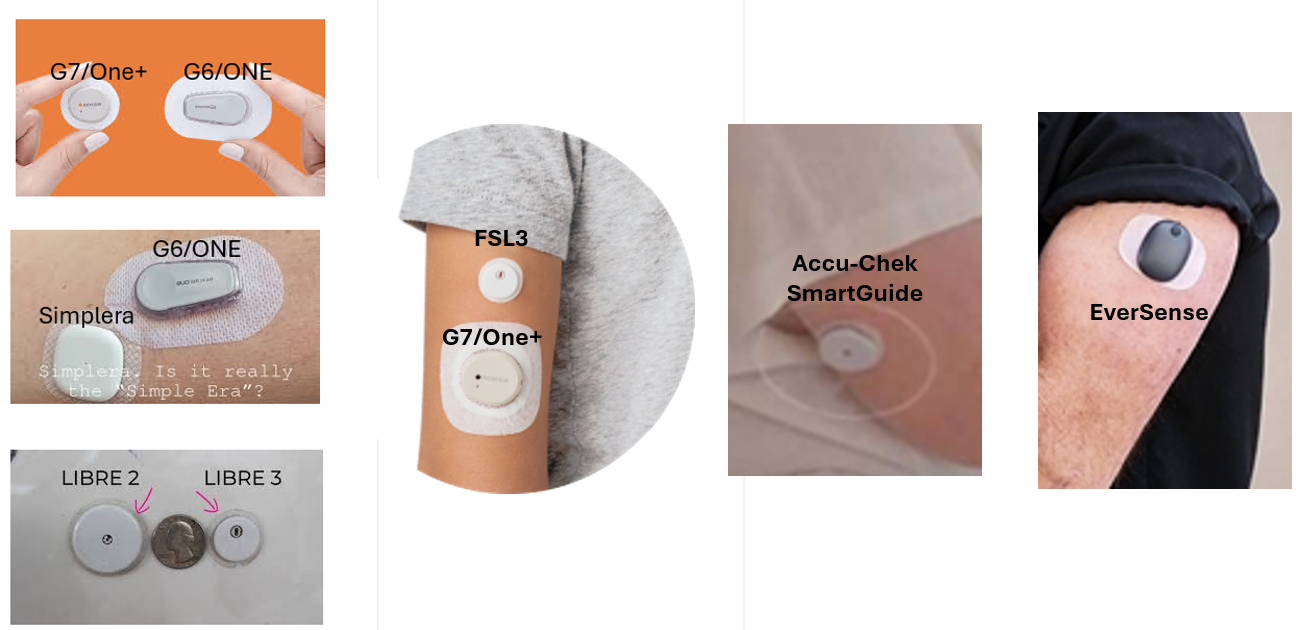
Sensor size and wear duration: comfort matters
FreeStyle Libre 3 / 3 Plus is currently among the smallest CGMs and offers up to 15-day wear (model-dependent). Other systems vary by wear duration.
Optional calibration: blessing or a curse?
Some CGMs allow optional calibration. Whether that is a gift or a curse depends on your finger-prick blood glucose testing technique and your personality.
Your CGM measures glucose in interstitial fluid, while a finger-prick test measures glucose in capillary blood. Because glucose has to move from blood into the interstitial space, there is always a time lag. When glucose is changing quickly, the two readings will differ.
Optional calibration lets you enter a finger-prick reading to nudge the CGM back towards blood glucose. This can be useful when there is a consistent gap between the sensor and a reliable finger-prick result, or when there is a false low or high alarm despite the CGM reading being accurate.

In practice, this can be beneficial in calibrating out of false low and high alarms — which may occur 1–5 times per month — but only if:
- You use an ISO-standard blood glucose meter with strong accuracy performance.
- You are rigorous about good testing technique, as discussed above.
Alerts and alarms: informed, not overwhelmed
All CGMs can alert for highs and lows. Some are simply more nuanced about it.
Advanced alarm features
- Dexcom G6 / G7 — Urgent Low Soon: predicts if glucose will fall below a set level in approximately 20 minutes.
- Dexcom G7 — delayed first high alarm: delays high alerts after meals to reduce “you ate food” alarms.

AI-powered predictive insights
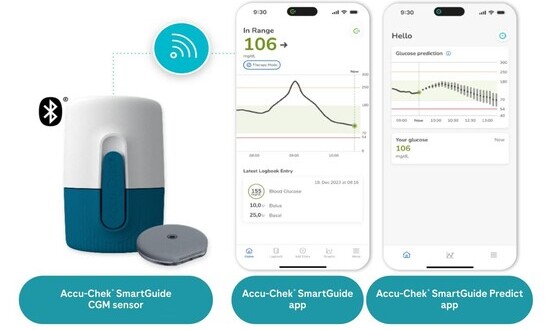
Accu-Chek SmartGuide introduces forecasting tools, including a 30-minute hypoglycaemia prediction alert, a two-hour projection, and a seven-hour overnight risk assessment. These predictions have been reported with >85% accuracy in modelling work using large real-world CGM datasets and in-silico simulations (see analysis).
Remote monitoring (Followers): keeping others in the loop
Most modern CGM systems allow “followers” — partners, parents, carers, or friends — to see your glucose data remotely. This is particularly useful for:
- children and young people,
- people with impaired hypo awareness,
- anyone who wants extra overnight reassurance.
For others, external monitoring may be unwanted. Functionally, the differences between CGMs here are often smaller than people think — this is more about whether you want the feature, and how easy the app experience is for your family or care network.
Receiver vs phone app: how do you want to see your data?
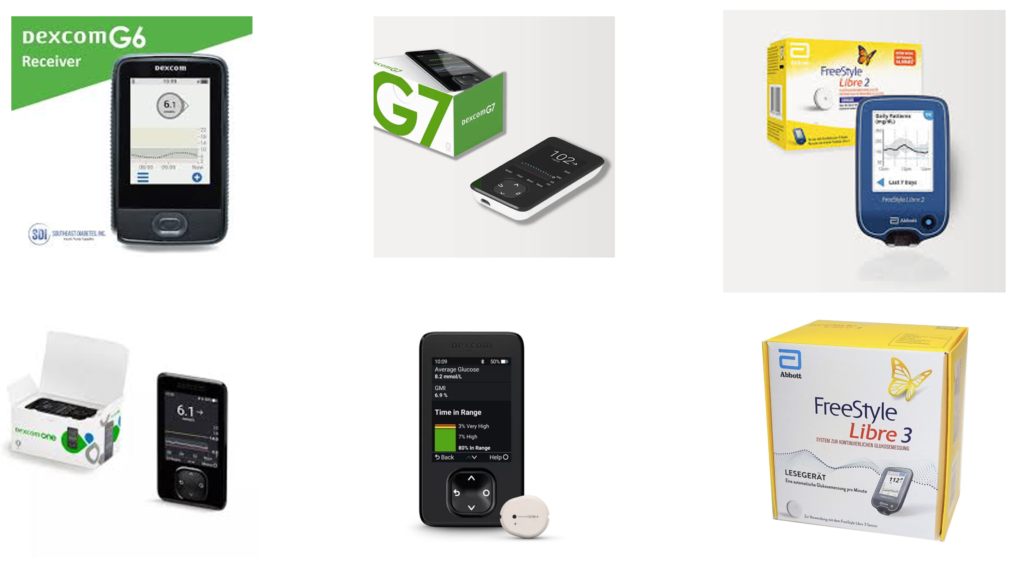
Some people love phone-only CGM. Others want a dedicated receiver (or a backup) so glucose data is not hostage to battery life, phone compatibility, or notification settings.
- Dexcom systems often offer receiver options depending on model and region.
- FreeStyle Libre readers can be useful for people who do not want CGM on their phone and may double as BG/ketone devices (model dependent).
This space is evolving quickly, and in 2026, we will have an updated guide.
Summary: which features matter most?
Safety and education first, then features.
| Priority | What to look for | Why it matters | CGM systems (examples) |
|---|---|---|---|
| Safety foundation | ISO BG meter + in-date strips + good technique | Your gold-standard backstop in doubt; enables safe calibration and sensible decisions | All CGMs (applies universally) |
| Hard-stop low alarms | Very low alarm that cannot be disabled (where available) | Reduces tail-risk exposure from silence or over-trust | Varies by device, region, and app/receiver setup (check local labelling) |
| Optional calibration | Manual calibration available (and whether you will use it correctly) | Can rescue drifting sensors and false alarms; poor calibration can worsen accuracy | Available on: Dexcom CGMs, Medtronic CGMs, Eversense CGMs. Not available on: Abbott FreeStyle Libre CGMs and Roche Accu-Chek CGM |
| Alarm intelligence | Prediction alerts, customisation, sensible delay logic | Reduces alarm fatigue while preserving safety protections | Dexcom G6/G7: Urgent Low Soon; Dexcom G7: delayed first high alarm; Accu-Chek SmartGuide: predictive forecasting suite |
| Wear and comfort | Wear time, size, adhesion, site flexibility | Comfort drives adherence; adherence drives outcomes | FreeStyle Libre 3/3 Plus: smallest |
| Followers | Easy sharing + reliable notifications | Critical for children, hypo unawareness, overnight reassurance | All CGM systems support sharing: Dexcom (Follow), Libre (LibreLinkUp), Medtronic ecosystems (CareLink), Roche SmartGuide, EverSense |
| Receiver vs phone | Backup display option | Practical resilience when phones fail, misbehave, or are not wanted | Varies by model and region |
| AID compatibility | Often the deciding constraint if you are AID-bound | Which pumps and algorithms does the CGM integrate with | Highly region-specific; see AID Systems Guide |
This content is for educational exploration only. It describes average responses and general principles. It is not medical advice and cannot replace individual clinical guidance from your diabetes care team.