
AID Systems Guide, Omnipod 5
Omnipod 5
Omnipod 5 is tubeless: there is no separate pump and no tubing, and the SmartAdjust algorithm runs inside the disposable Pod itself, adjusting delivery every few minutes. Your personal glucose target is the primary lever, the setting you and your team reach for to steer control tighter or looser. And it links with a choice of continuous glucose sensors: the Dexcom G7 and G6, and the FreeStyle Libre 2 Plus. It is licensed from age 2.
Omnipod 5 at a glance
- Primary lever: your personal glucose target, adjustable in steps from 6.1 to 8.3 mmol/L (110 to 150 mg/dL); the lowest target is associated with the most time in range (Forlenza et al. 2024)
- Second lever: the insulin-action-time is user-adjustable on Omnipod 5 (roughly 2 to 4 hours across the ladder), unlike CamAPS FX
- Age range: 2 years and older
- Time in range: 68.8% median in real-world registry use on the lowest target (Forlenza et al. 2024), a real-world median not a trial result; the best-performing groups reach higher, with about 46% of lowest-target users achieving over 70% and 18% over 80% time in range, and adults on the lowest target reaching 75.6% in the pivotal trial (Brown et al. 2021)
- Known for: the only tubeless AID, the algorithm running inside the Pod, automated correction by modulating delivery (up to four times the adaptive basal rate, not separate boluses), and Activity mode
- CGM options: Dexcom G7 (and Dexcom G6), plus FreeStyle Libre 2 Plus. Regional availability varies
GNL thinks of Omnipod 5 as the Iron Man of AID systems.

Like Iron Man, it has a sleek exterior with all the magic happening underneath. That means SmartAdjust keeps running even when the controller or phone are out of sight.
System profile
What it looks like
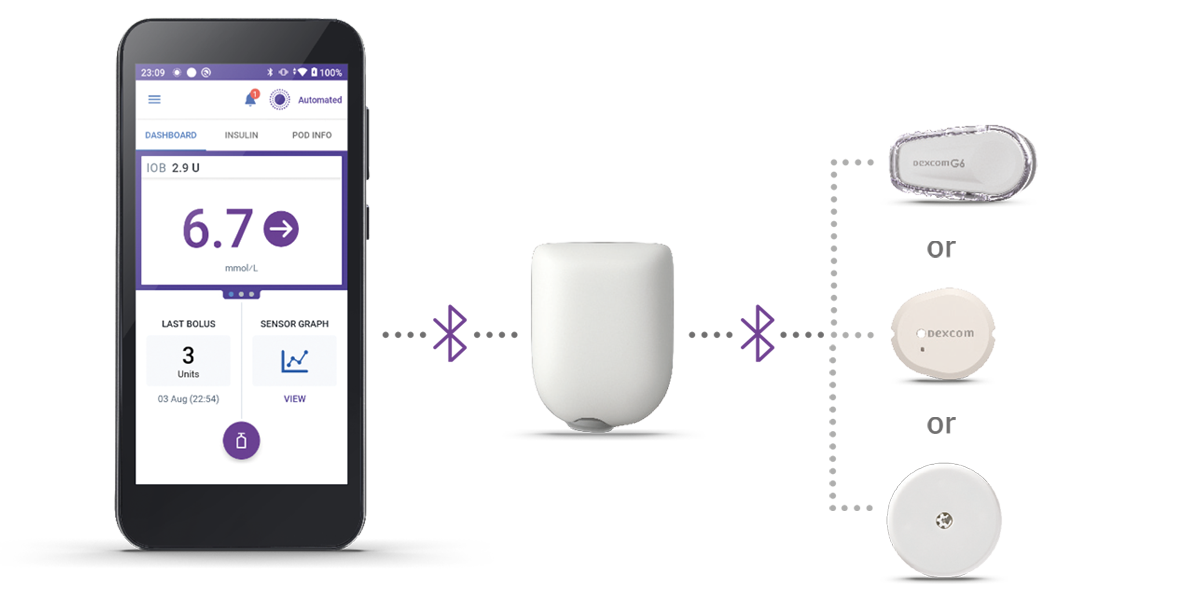
Omnipod 5 is a single tubeless Pod worn directly on the body, holding the insulin reservoir, the cannula, and the SmartAdjust algorithm together in one unit. There is no separate pump and no tubing; a phone or the supplied Controller is used to view data and give meal boluses, but the automation runs in the Pod.
Tubeless, with the algorithm in the Pod
The SmartAdjust algorithm sits inside the disposable Pod and adjusts insulin delivery every five minutes, without needing a constant connection to your phone. This is the simplest day-to-day AID operation to run: the phone is for monitoring and mealtime boluses, not for keeping the loop alive. It is the one system in this cluster where automation continues even if the phone is out of range.
CGM interoperability
Omnipod 5 pairs with the Dexcom G7 (and the Dexcom G6), and with the FreeStyle Libre 2 Plus. Regional availability varies, so verify the current market pairing before a market-specific claim.
Age bands and regulatory status
Omnipod 5 with SmartAdjust is an FDA-cleared interoperable automated glycaemic controller (iAGC), cleared 27 January 2022 (K203774), and is indicated from 2 years and older.
Omnipod 5 has a wide age-range indication and is expanding its connectivity with different sensors, making it very versatile.
How the algorithm works
Omnipod 5 runs the SmartAdjust model predictive control algorithm inside the Pod. Every five minutes it forecasts where your glucose is heading, about 60 minutes ahead, and adjusts its automated delivery towards your chosen target, increasing, decreasing, or pausing. To bring a high down it does not give a separate correction bolus; instead it steps up its automated delivery, up to four times its adaptive basal rate, in small amounts every five minutes. It adapts to you over the first Pod cycle, roughly the first three days, picking up your individual insulin pattern, so expect steadier performance from the second Pod onwards (Brown et al. 2021, SECURE-T1D; Forlenza et al. 2024).
The personal glucose target is the primary lever. You set it in steps from 6.1 to 8.3 mmol/L (110 to 150 mg/dL), and the lowest target is associated with the most time in range (about 54% of real-world users sit on the lowest target; Forlenza et al. 2024). Unlike CamAPS FX, Omnipod 5 also lets you set the insulin-action-time, so it is a genuine second lever here rather than a fixed internal model. The insulin-to-carbohydrate ratio is the setting behind both, kept sensible to match rather than tuned hard on its own.
Activity mode is the exercise setting: it raises the target to 8.3 mmol/L (150 mg/dL) and holds back its automated correction for about one to two hours, lowering the risk of exercise-induced lows.
Focus on the target level, and use time-blocks to deal with times of the day with differing insulin sensitivity. Shortening the acting time lets the user’s own corrections be more frequent and stronger, for more time in range.
Optimising Omnipod 5: the five-level ladder
The personal glucose target is the primary lever, and the GNL AID Optimiser sets Omnipod 5 out as a five-level ladder of algorithm strength. As you move up the ladder, the target comes down, the insulin-action-time shortens, and more of your total daily insulin is delivered as algorithm-driven insulin rather than as your own meal boluses. The insulin-to-carbohydrate ratio is the secondary setting, kept to match the split at each level.
| Level | Algorithm strength | Target (mmol/L) | Insulin-action-time | Algorithm-driven / bolus insulin | CF rule (mmol/L) |
|---|---|---|---|---|---|
| 5 | Very high | 6.1 | 2 h | 65% / 35% | 80 / TDD |
| 4 | High | 6.1 | 2.5 h | 60% / 40% | 85 / TDD |
| 3 | Medium (usual start) | 6.7 | 3 h | 55% / 45% | 90 / TDD |
| 2 | Low | 7.2 | 3.5 h | 50% / 50% | 100 / TDD |
| 1 | Very low | 8.3 | 4 h | 45% / 55% | 110 / TDD |
The correction-factor rule is divided by your total daily dose (TDD) to give the correction factor for that level. Most people start around Level 3 and move up in strength as tolerated. All the figures shown sit within Insulet’s adjustable range.
This ladder is a GNL educational synthesis, Grade D, reviewed with input from the manufacturers’ medical leads but not endorsed; full detail in the Notes below. Any change to your target, insulin-action-time, correction factor, or insulin-to-carb ratio is a conversation with your diabetes care team.
Target level, insulin-action-time, correction factor, and the algorithm-driven versus bolus insulin split are the same levers the GNL AID Algorithm Optimiser Explorer works with for this system across these five levels (educational synthesis, not a device setting).
The stop condition. If time below 3.9 mmol/L rises above 4%, hold at the current level or step back down one.
Start the target level as low as possible for the most time in range, and keep the acting time short so the user can correct more frequently if required.
Exercise: getting the most out of Activity mode
Activity mode is the exercise setting. When you turn it on, Omnipod 5 raises its target to 8.3 mmol/L (150 mg/dL) and holds back its automated correction for about one to two hours, lowering the risk of exercise-induced lows. The EASD/ISPAD 2025 position statement (Moser, Zaharieva, Pemberton et al.) recommends activating it about 60 to 90 minutes before planned activity, so it has time to reduce the insulin already on board. Published evaluation of the feature is still limited (Turner 2024).
Then take small carbohydrate top-ups every 20 minutes as needed, rather than one large amount upfront: a big carbohydrate load can spike glucose and, once Activity mode ends, prompt a stronger correction.
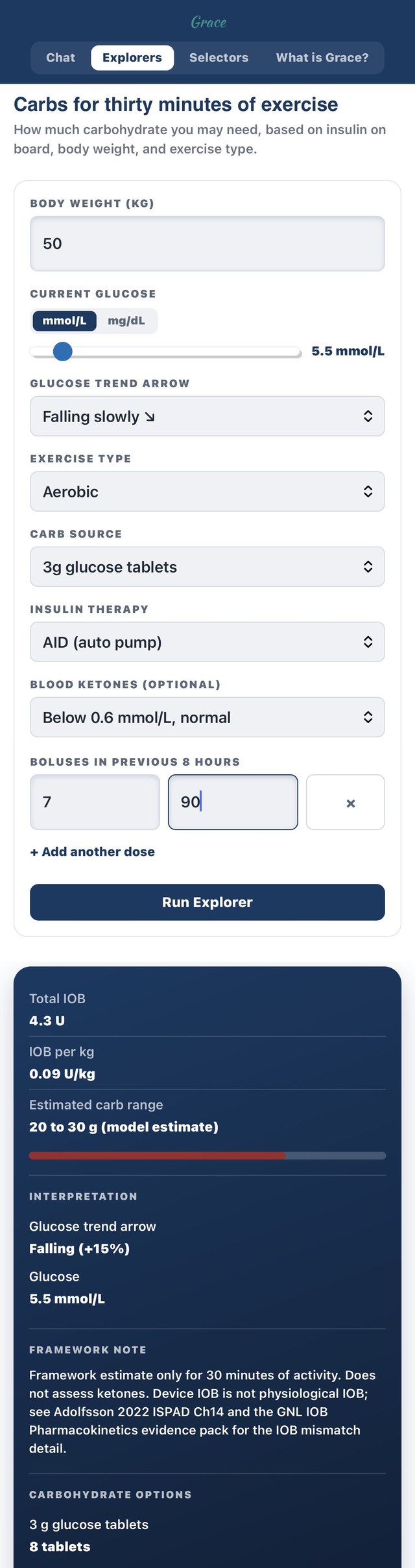
This is a live capture of GNL’s free Carbs for Thirty Minutes of Exercise Explorer, one of the tools on the Grace page. To find it: open theglucoseneverlies.com/gnl-grace, accept the one-off consent step, choose the Explorers tab, then Carbs for Thirty Minutes of Exercise. The snippet below shows the input side (top: 50 kg, 5.5 mmol/L falling slowly, aerobic exercise, AID/auto pump insulin therapy, a 7-unit bolus taken 90 minutes earlier) and the output it produced (bottom: insulin-on-board and the estimated carbohydrate range) for a 50 kg person. Enter your own weight and recent doses to get your own estimate.
For planned, longer sessions, the T25/T25 framework below is written for AID systems specifically; the manual reductions are smaller than the injections or pump-only version because the algorithm is already doing some of the work.
The AID and Exercise Consensus Guideline (EASD/ISPAD 2025, Moser, Zaharieva, Pemberton et al.) is worth reading alongside this.
Get Activity mode on, as it also relaxes the algorithm strength during the exercise.
Meals: high-fat and high-protein
Omnipod 5’s main tool for a delayed rise is the algorithm’s own automated correction. It does not give a separate correction bolus; instead it steps up its automated delivery (up to four times its adaptive basal rate, in small amounts every five minutes) when it forecasts your glucose climbing later. You enter all the carbohydrate upfront using your normal insulin-to-carb ratio and let the automated correction catch the rest. For a high-fat or high-protein meal, where the rise arrives slowly, this often means the correction catches up a little later than you would expect, so the first hour or two can run higher than after a plain carbohydrate meal.
Adjusting from experience. A common technique is “fake carbs”: if a delayed rise still shows up a couple of hours after eating, entering some extra carbohydrate (typically 25 to 50% of the original amount) around 90 minutes after the meal prompts more insulin. If glucose instead runs low in the first 2 to 3 hours, entering around 75% of the carbohydrate upfront is a common alternative. These are population-average starting points for exploration, not a personal prescription.
The technical detail: why delayed absorption is harder to pre-empt on a target-and-modulated-delivery system
Omnipod 5 steers to your target and steps up its automated delivery when it forecasts a high, rather than giving a separate correction bolus; it does not deliver a meal dose spread over several hours in advance. A high-fat or high-protein meal releases its glucose slowly, so the forecast may not cross the correction threshold early, meaning the automatic correction arrives later than you would expect. Entering carbohydrate in two steps, or adjusting the insulin-to-carb ratio for that meal with your care team, is a way of telling the system what a single upfront bolus cannot.
You may find fake carbs are needed 90 to 120 minutes after eating for very high-fat meals. Keeping the acting time close to 2 hours also allows stronger corrections.
Hypo management
The algorithm prevents many overnight lows by easing or suspending insulin as glucose falls or is forecast to fall, but lows still happen, especially with unplanned exercise or a bolus that turns out too strong. Treatment amounts often need to be smaller than before AID, because Omnipod 5 has usually already reduced delivery earlier than you would expect. Worth treating pre-emptively if glucose is 4.0 to 6.0 mmol/L (70 to 110 mg/dL) and trending down, rather than waiting for a lower reading to confirm it. For planned activity, Activity mode ahead of time is the cleaner tool than chasing lows with carbohydrate.
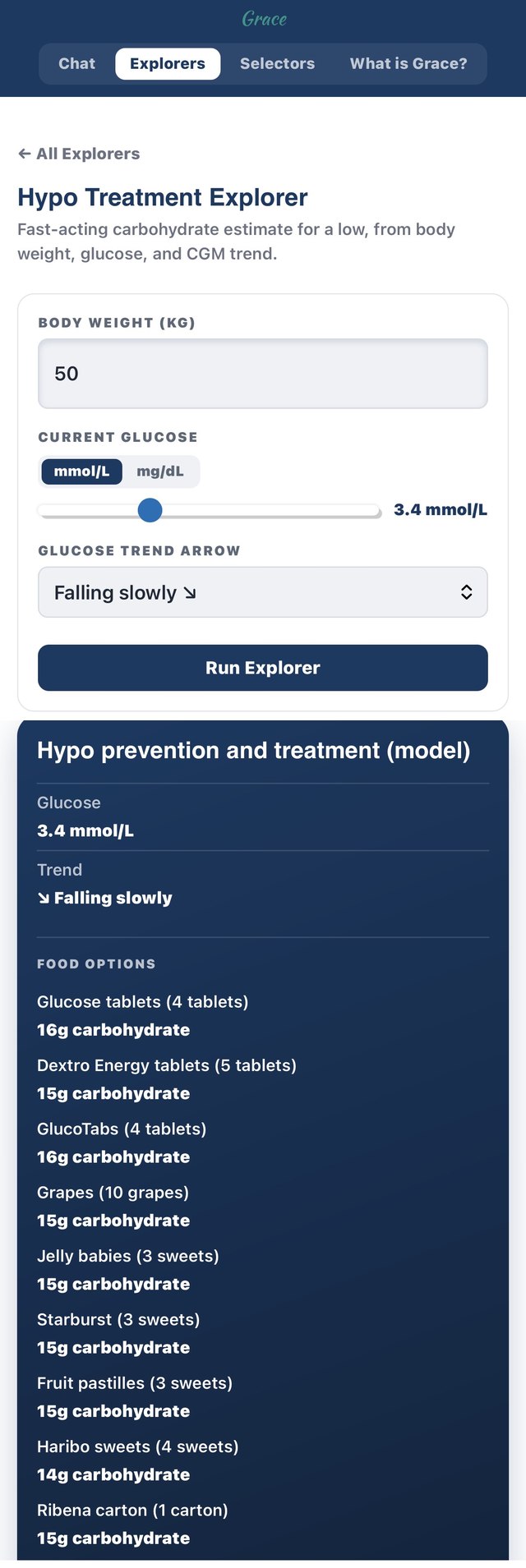
This is a live capture of GNL’s free Hypo Treatment Explorer, another of the tools on the Grace page. To find it: open theglucoseneverlies.com/gnl-grace, accept the one-off consent step, choose the Explorers tab, then Hypo Treatment Explorer. The snippet below shows the input side (top: 50 kg, 3.4 mmol/L, falling slowly) and the output it produced (bottom: a fast-acting carbohydrate estimate with everyday food options). Enter your own weight, glucose, and trend for your own estimate.
If you’re getting a lot of hypos after treating highs, relax the correction factor with your team.
Hyper management
Omnipod 5’s automated correction catches a lot of highs before they need anything else, but a high with rising ketones is a different situation, one the algorithm does not manage on its own. On a tubeless Pod the delivery-failure mode is a Pod that has stopped delivering, a cannula occlusion or a site problem, and the pivotal trial’s DKA episodes were linked to a suspected infusion-site failure, so a rising glucose the algorithm is not bringing down, especially with nausea or abdominal pain, means a ketone check, a correction by pen or injection, and a Pod change, on the same sick-day pathway as any other therapy.
This is a live capture of GNL’s free Hyper Treatment Explorer, another of the tools on the Grace page. To find it: open theglucoseneverlies.com/gnl-grace, accept the one-off consent step, choose the Explorers tab, then Hyper Treatment Explorer. The snippet below shows the input side and the output it produced. Enter your own weight, TDD, glucose, and ketone reading, and select your own system under Therapy or AID, for your own estimate.
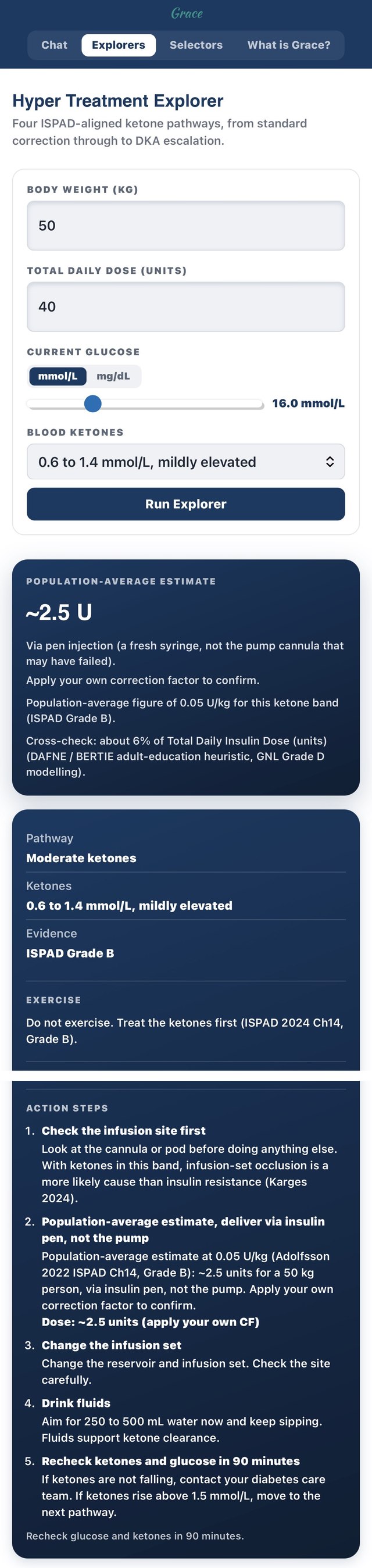
A glucose stuck above 15.0 mmol/L (270 mg/dL) for a couple of hours, with no missed-bolus explanation, usually points to a delivery problem rather than a high that just needs a correction, so it is worth checking the Pod.
Under-5s
Omnipod 5 is indicated from 2 years and older, so it covers the 2-to-5 age band rather than infants under 2 (for whom CamAPS FX carries the wider, from-age-1 licence). For a young child, the tubeless Pod is often the practical draw: no tubing to catch or pull, and the algorithm keeps running in the Pod without a phone in reach.
Children under six show a distinct diurnal insulin-need pattern: a clear evening rise in insulin need followed by an overnight fall (Biester et al. 2023, DPV registry, n=25,718). On Omnipod 5, the lever families use with their team is the personal glucose target across those windows, tighter overnight and easing through the evening rise, the same dusk-then-dawn pattern that shapes preschool settings on every AID system. This is a clinic conversation, not a parental adjustment. The related midday hypo trap and the equivalent tactics for other systems are covered in Type 1 in infants and preschoolers.
Try a tighter personal glucose target from 6pm to 10pm, then a more relaxed target overnight, to match the dusk-then-drop pattern I see in young children: glucose tends to rise in the early evening and then drop away through the night. This is a care-team conversation, not a parental adjustment.
Listen: Mastering Omnipod 5
For the wider picture across all the systems: Episode 6: Ten Tips to Optimise Time in Range, paired with the Top 10 Tips to Optimise Time in Range: AID Systems page.
This podcast puts this page into context.
Notes
Regulatory detail, evidence depth, and framing caveats behind this page
- GNL Insights. The GNL Insights boxes are the team’s own perspective and clinic experience: opinion and pattern-recognition, not a stated clinical fact or a personalised recommendation.
- Not an Insulet-endorsed configuration (Optimising Omnipod 5). The five-level ladder is a GNL educational synthesis, graded D on a Grade A and B evidence base. The ladder, and the settings adjusted at each level, were reviewed and refined with input from the CamAPS, MiniMed, Tandem and Insulet global medical leads; that input shaped which levers are exposed and how they are described, but the levels are not validated against any manufacturer’s simulator, so this is not a manufacturer endorsement. Any settings change is a conversation with your diabetes care team.
- Age indication. Omnipod 5 is licensed from 2 years and older, not from age 1.
- Activity mode evidence. Activity-mode use is Grade C (Turner 2024 mechanics; EASD/ISPAD 2025 timing guidance); full published evaluation is pending.
- Population-average framing (Meals). The high-fat and high-protein starting points are population-average; individual responses vary, and any change is a conversation with your diabetes care team.
References
Key papers behind this page. Tap to expand.
Pivotal and real-world outcomes
- Brown SA, Forlenza GP, Bode BW et al. (2021). Multicenter trial of a tubeless, on-body automated insulin delivery system (SECURE-T1D). Diabetes Care. 44(7):1630-1640. n=241. Adults on the lowest target reached 75.6% time in range. DOI: 10.2337/dc21-0172.
- Forlenza GP, DeSalvo DJ, Aleppo G et al. (2024). Real-world Omnipod 5 outcomes. Diabetes Technology and Therapeutics. n=69,902. Median TIR 68.8% on the lowest target; among lowest-target users, 46.1% achieved time in range over 70% and 18.3% over 80%. DOI: 10.1089/dia.2023.0578.
- Gera S et al. (2025). Omnipod 5 vs Control-IQ in youth. Journal of Clinical Endocrinology and Metabolism. n=428. DOI: 10.1210/clinem/dgaf006.
- Insulet. Omnipod 5 SmartAdjust technology, HCP information (omnipod.com). Accessed 2026-07-19. Correction mechanism: modulates automated delivery up to four times the adaptive basal rate; no separate correction bolus.
Paediatric and exercise evidence
- Biester T et al. (2023). DPV registry, under-6 diurnal insulin-need pattern. Diabetes Technology and Therapeutics. n=25,718.
- Moser O, Zaharieva DP, Pemberton J et al. (2025). EASD/ISPAD position statement on exercise and AID.
Omnipod 5